Understanding answers, citations and confidence
RefineAI Answers is built on a simple promise: never a guess without a source. This page explains the signals that come with every answer, and how to use them to decide how much weight to give it.
Confidence levels
Every answer opens with a badge:
| Badge | Meaning | What to do |
|---|---|---|
| 🟢 High Confidence | Answered confidently from indexed documents; sources match the question well. | Use it — and glance at the citations if the stakes are high. |
| 🟦 Medium Confidence | Answered, but with some uncertainty. | Read the excerpts before relying on it. |
| 🟡 Low Confidence | An answer was found but the supporting passages are weak. | Treat as a lead, not an answer. Verify in the source documents. |
| 🔴 Insufficient Data | Your documents don't cover this. No answer is invented. | Follow the suggested next steps — usually upload a covering document. |
There's a fuller discussion in the confidence reference.
Citations
Statements in an answer carry numbered markers — [1], [2] — and each number appears in the Sources list below with:
- the document name, linked to its details page,
- the chunk (which extracted passage it came from) — or Figure · page N when the source is a chart, diagram or photo in a PDF (see Figures in PDFs),
- the relevant excerpt — the passage itself, so you can check the claim without opening anything. For a figure, the excerpt is the written description of the image, and the page number tells you where to look in the original.
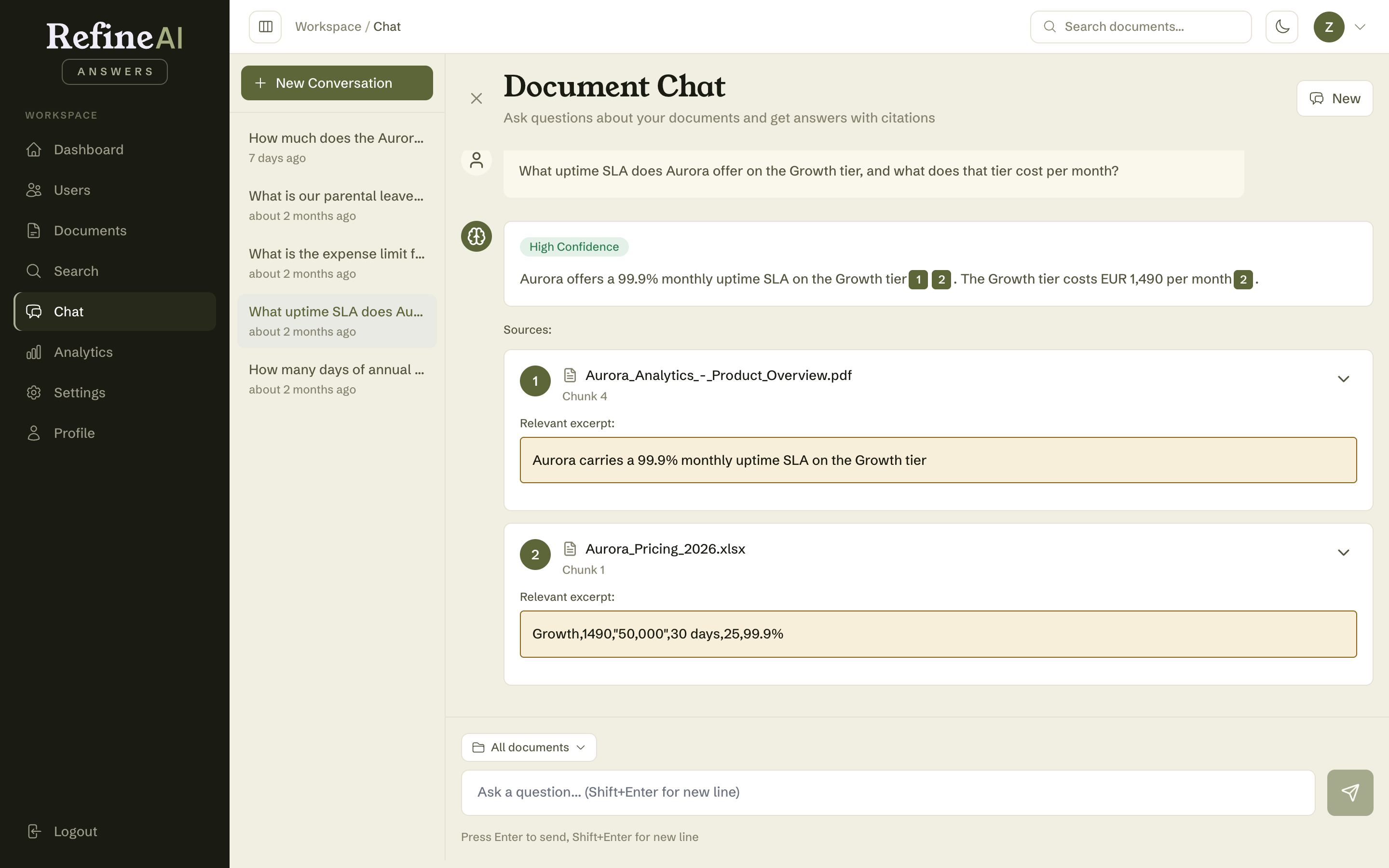
Citations work across every format — the answer above draws its SLA claim from a PDF and the price from a row in an Excel workbook.
Make a habit of the excerpts. They're the fastest verification loop available: claim → excerpt → done. If you need more context, the document link takes you to the full extracted text.
When the system is being cautious
Two extra notices can appear on an answer:
- Degraded search — retrieval ran in a reduced mode (fewer documents were searched than usual). The answer may be incomplete; retrying is reasonable.
- Unverified sources — the model referred to sources that couldn't be matched to retrieved passages. Those references are flagged rather than presented as citations, so you know exactly which parts carry evidence.
An honest "I don't know"
Insufficient Data answers explain what the documents do contain and offer next steps:
- Rephrase — try different keywords or a more specific question.
- Upload a document that covers this topic — the permanent fix.
- Check the diagnostic search — see what your library actually returns for the query.
These moments aren't failures — they're your knowledge base telling you where it's thin. Admins can review them in bulk under Gap analysis.