Document details
Select any document's name — in the library, on the dashboard, or in a citation — to open its details page. This is the complete record of one document: what was extracted from it, how processing went, and every version you've uploaded.
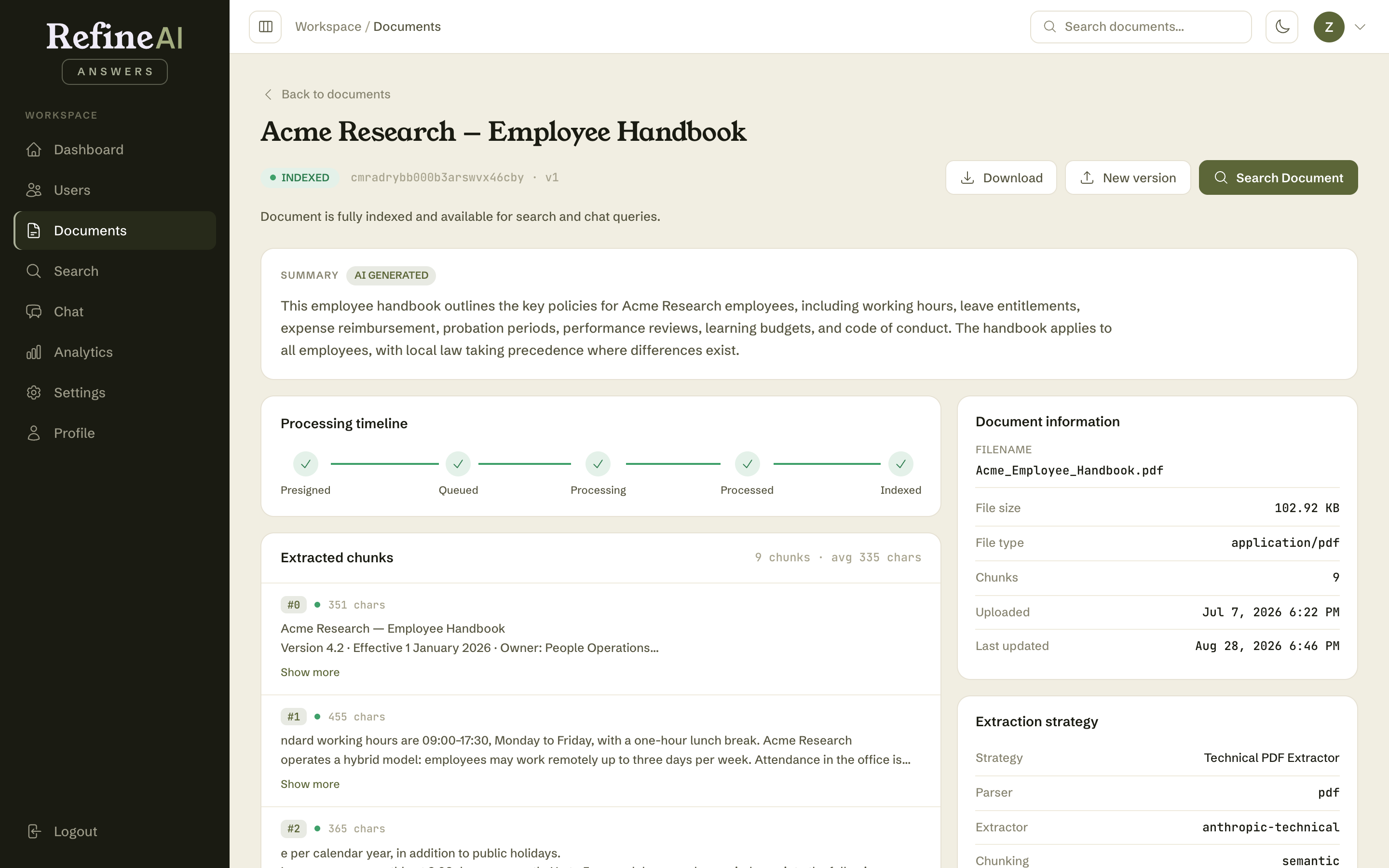
At the top
- Title — extracted from the document itself (falls back to the filename).
- Status pill and explanation — e.g. INDEXED — Document is fully indexed and available for search and chat queries.
- Download — retrieve the original file exactly as uploaded.
- New version — upload a replacement (see below).
- Search Document — jump to Search scoped to this document.
AI-generated summary
A short summary of the document, produced automatically during processing and labelled AI GENERATED. Useful for confirming at a glance that the right content was extracted.
Processing timeline
The five stages a document passes through — Presigned → Queued → Processing → Processed → Indexed — each ticked green as it completes. If processing fails, the timeline shows where it stopped, which is the first thing to check before reprocessing. Stage meanings: document statuses.
Extracted chunks
The passages ("chunks") that were extracted from the document — these are the units that Search matches and Chat cites. Each chunk shows its index, character count, health indicator, and text (Show more expands long ones). The panel header shows the totals (e.g. 9 chunks · avg 335 chars).
If an answer ever cites a passage that looks wrong, this is where to investigate: find the chunk, read what was actually extracted, and — if the extraction looks poor — consider reprocessing the document or adjusting extraction settings.
Figures in PDFs
Charts, diagrams and photographs embedded in a PDF are described in words and stored as extra chunks after the text ones. Each begins Figure (chart) on page 4: … followed by the labels, legend entries and numbers printed on the image, quoted as they appear. That is what lets Chat answer a question whose only evidence is a bar chart or a product photo.
A few things to know:
- Only printed values are recorded. The description never estimates a number from the height of a bar or the position of a point. If a chart's values aren't printed on it, the description says so.
- Decoration is skipped. Logos, icons, page backgrounds and stock photos with no information content are not stored, and repeated images (the same logo on every page) are described once.
- Charts drawn as vector graphics can't be captured yet. Figures are found by locating images embedded in the PDF. A chart drawn with lines and text rather than pasted in as an image has no image to describe.
- Older documents. PDFs processed before figure support was added gain figure chunks without being reprocessed — text chunks and existing citations are untouched.
Document information
The technical card: filename, file size, MIME type, chunk count, upload date and last update.
Extraction strategy
Which strategy processed this document — its parser, extractor, and chunking method (e.g. Technical PDF Extractor · pdf · anthropic-technical · semantic).
Versions and reprocessing
- New version — when a document is updated (a new policy revision, a new price list), upload the replacement here. The new version is processed and takes over answering; previous versions remain in the version history with download links, so there's always an audit trail of what the system knew and when.
- Reprocess — re-runs extraction and indexing for the current file. Use it after a FAILED status or when extraction settings have changed.
Next: Collections →