What is RefineAI Answers?
RefineAI Answers is your organisation's private question-answering system. You upload the documents your team relies on — policies, product specs, pricing sheets, manuals — and then ask questions in plain English. Instead of digging through folders or skimming PDFs, you get a direct answer with the receipts to back it up.
The three ideas behind every answer
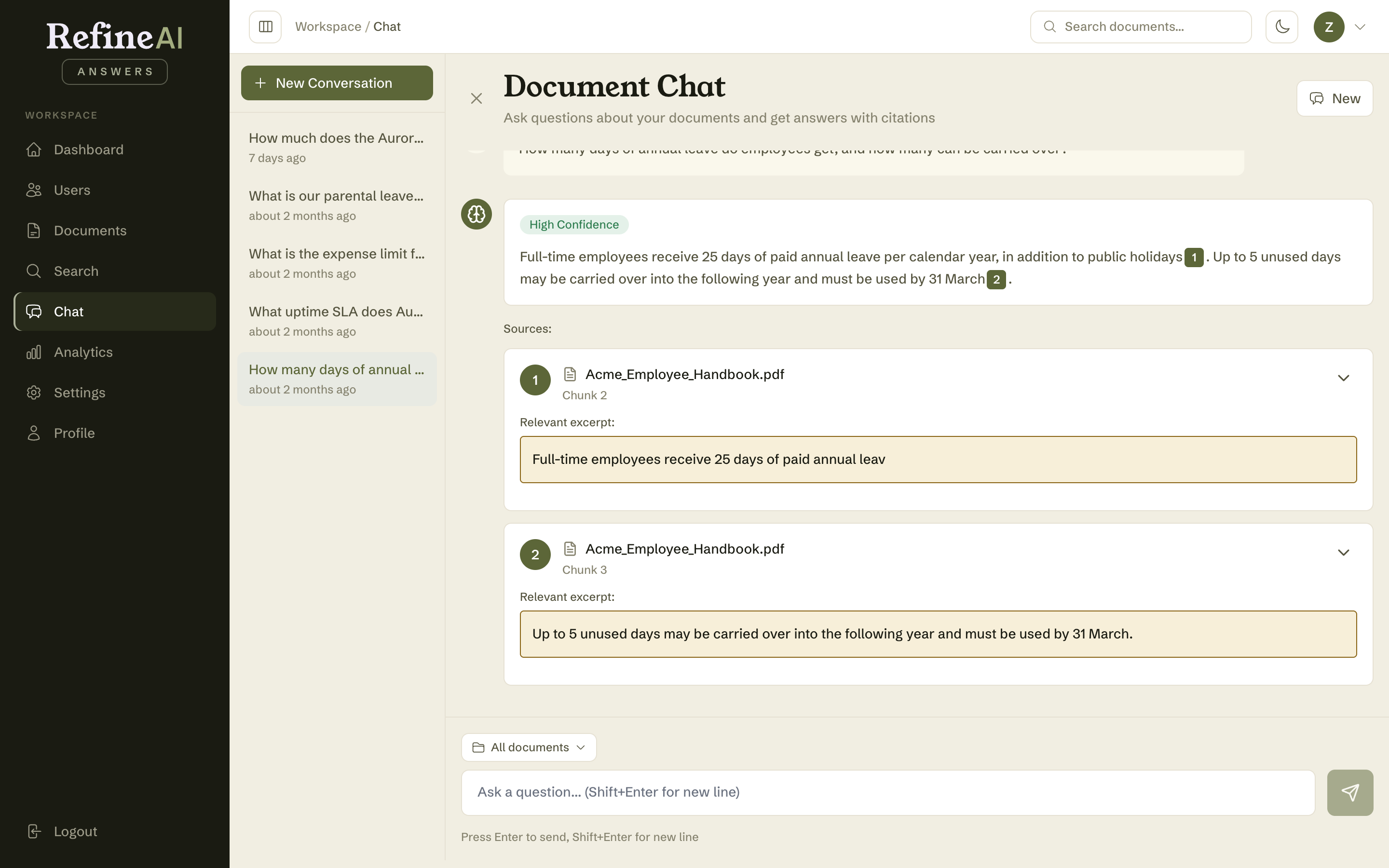
1. Answers come only from your documents. RefineAI Answers does not answer from general knowledge or the open internet. It retrieves relevant passages from documents your organisation has uploaded and composes an answer from those passages alone. Your knowledge base is private to your organisation — no other tenant can see it, and you can't see theirs.
2. Every claim is cited. Answers include numbered citation markers — like [1] and [2] — that link each statement to the source passage it came from. You can read the exact excerpt, see which document and section it belongs to, and open or download the original file. You never have to take an answer on faith.
3. Confidence is stated honestly. Each answer carries a confidence rating — High, Medium, Low, or Insufficient Data. When your documents simply don't cover a topic, RefineAI Answers tells you that plainly and suggests what to do next (usually: upload a document that covers it). It will not invent an answer to fill the silence. See Understanding answers for the full breakdown.
What you can do with it
| I want to… | Where to go | Guide |
|---|---|---|
| Get an answer to a question | Chat | Document Chat |
| Find the passages that mention a topic | Search | Searching your documents |
| Add knowledge to the system | Documents → Upload | Uploading documents |
| Organise the library | Documents → Collections | Collections |
| See what people are asking — and what's going unanswered | Analytics | Gap analysis |
| Add teammates and control access | Users | User management |
| Connect other systems via API | Settings → API Keys | API keys |
Who sees what
Access is controlled by your role in the organisation:
- Viewer — can ask questions, search, and read analytics.
- Member — everything a Viewer can do, plus upload and manage documents.
- Admin — everything a Member can do, plus manage users and organisation settings.
- Owner — full control of the organisation.
If a section of this guide doesn't apply to your role (for example, Users or Settings), you simply won't see that item in your sidebar. Details in Users, roles and permissions.
Next: Signing in →